Screen protectors are great for keeping your iPhone display safe from scratches, smudges, and everyday wear. But over time, they can get dirty, start peeling at the edges, or become outdated when it's time for an upgrade.
If you're ready to remove your old screen protector but are worried about damaging your phone don’t stress. It’s easier than you think! In this blog, we’ll walk you through the safest and simplest way to remove a screen protector from your iPhone, step-by-step. No special tools are needed just a bit of patience and care.
How to Remove Screen Protector from iPhone?
Before you begin, gather these basic items:
A credit card or thin plastic card
A piece of masking tape or scotch tape
A microfiber cloth
Optional: A hair dryer (for stubborn adhesives)
Step-by-Step Instructions
Step 1: Wash Your Hands
Clean hands are important. You don’t want to get fingerprints or dirt on your iPhone screen once the protector is off.
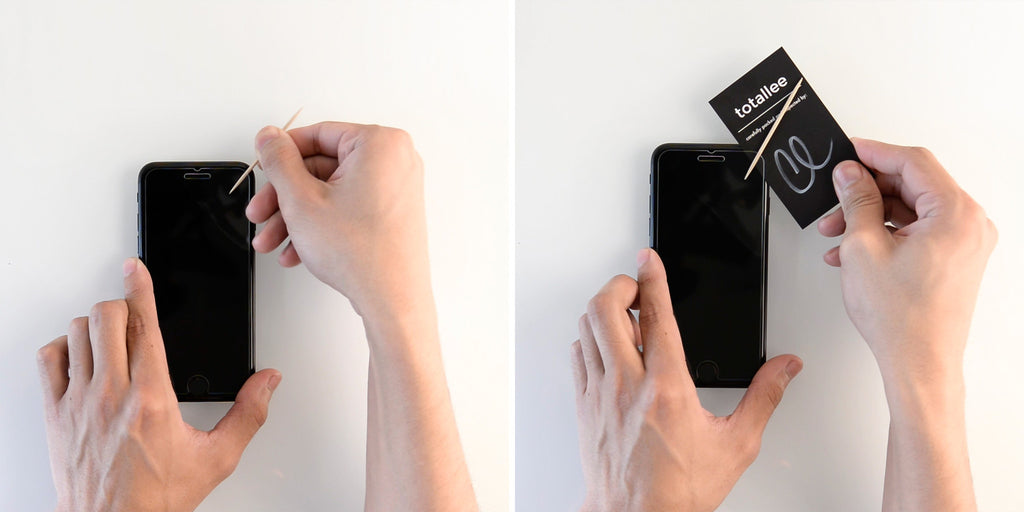
Step 2: Find a Corner to Lift
Start at one of the top corners of your screen protector. This is usually the easiest place to lift.
Here’s how:
Gently use your fingernail or a credit card to lift the edge.
Don’t dig too hard — just enough to get a small opening under the protector.
Pro Tip: If the protector is really stuck, apply gentle heat with a hair dryer on low for about 15 seconds. This softens the adhesive and makes removal easier.
Step 3: Slowly Peel Off the Screen Protector
Once you have a corner lifted, hold it between your fingers and start peeling it back slowly and gently. Pull it off diagonally across the screen for better control.
Don’t rush — fast pulling can cause the protector to crack or leave adhesive behind.
Try to peel in one continuous motion if possible.
Step 4: Use Tape if Needed
If you can’t grip the edge, use a piece of scotch tape to help.
Here’s how:
Stick the tape to a corner of the screen protector.
Press it down firmly.
Gently pull up on the tape — the protector should lift with it.
Step 5: Clean Your iPhone Screen
After removing the screen protector, your screen might have some residue or dust. Use a microfiber cloth to gently wipe it clean.
Related Article: What Is The Disadvantage Of A Tempered Glass Screen Protector?
For stubborn spots:
Lightly dampen the cloth with water or a screen-safe cleaner.
Avoid using any harsh chemicals or spraying liquid directly on the phone.
Extra Tips
Avoid metal tools like knives or screwdrivers — they can scratch the screen or damage the device.
If your protector is made of tempered glass, handle it carefully to avoid injury. Dispose of it in a safe way (wrap it in paper or a bag).
After removal, consider installing a new screen protector right away to keep your screen protected.
When Should You Remove a Screen Protector?
You don’t need to change your screen protector often, but here are signs it’s time for a replacement:
Cracks or chips in the glass
Peeling or bubbling edges
Dust or dirt trapped underneath
Poor touch sensitivity
What to Do After Removal?
Now that your old screen protector is off:
Inspect your screen for any scratches or damage.
If everything looks good, go ahead and apply a new screen protector.
Or, if you prefer to go without one, just keep your screen clean and handle your iPhone with care.
Final Thoughts
Removing a screen protector from your iPhone doesn’t have to be difficult. With the right technique and a gentle touch, you can peel it off without leaving any damage or residue.
Whether you’re replacing it with a new one or just going screen protector-free, following these steps will keep your iPhone looking clean and sharp. Have a tricky protector that won’t budge? Let us know your situation in the comments — we’re happy to help!
Read Also : Which is the best company in making smart mirrors?
 Nora Hazel
Screen protectors are great for keeping your iPhone display safe from scratches, smudges, and everyday wear. But over time, they can get dirty, start peeling at the edges, or become outdated when it's time for an upgrade.
If you're ready to remove your old screen protector but are worried about damaging your phone don’t stress. It’s easier than you think! In this blog, we’ll walk you through the safest and simplest way to remove a screen protector from your iPhone, step-by-step. No special tools are needed just a bit of patience and care.
How to Remove Screen Protector from iPhone?
Before you begin, gather these basic items:
A credit card or thin plastic card
A piece of masking tape or scotch tape
A microfiber cloth
Optional: A hair dryer (for stubborn adhesives)
Step-by-Step Instructions
Step 1: Wash Your Hands
Clean hands are important. You don’t want to get fingerprints or dirt on your iPhone screen once the protector is off.
Step 2: Find a Corner to Lift
Start at one of the top corners of your screen protector. This is usually the easiest place to lift.
Here’s how:
Gently use your fingernail or a credit card to lift the edge.
Don’t dig too hard — just enough to get a small opening under the protector.
Pro Tip: If the protector is really stuck, apply gentle heat with a hair dryer on low for about 15 seconds. This softens the adhesive and makes removal easier.
Step 3: Slowly Peel Off the Screen Protector
Once you have a corner lifted, hold it between your fingers and start peeling it back slowly and gently. Pull it off diagonally across the screen for better control.
Don’t rush — fast pulling can cause the protector to crack or leave adhesive behind.
Try to peel in one continuous motion if possible.
Step 4: Use Tape if Needed
If you can’t grip the edge, use a piece of scotch tape to help.
Here’s how:
Stick the tape to a corner of the screen protector.
Press it down firmly.
Gently pull up on the tape — the protector should lift with it.
Step 5: Clean Your iPhone Screen
After removing the screen protector, your screen might have some residue or dust. Use a microfiber cloth to gently wipe it clean.
Related Article: What Is The Disadvantage Of A Tempered Glass Screen Protector?
For stubborn spots:
Lightly dampen the cloth with water or a screen-safe cleaner.
Avoid using any harsh chemicals or spraying liquid directly on the phone.
Extra Tips
Avoid metal tools like knives or screwdrivers — they can scratch the screen or damage the device.
If your protector is made of tempered glass, handle it carefully to avoid injury. Dispose of it in a safe way (wrap it in paper or a bag).
After removal, consider installing a new screen protector right away to keep your screen protected.
When Should You Remove a Screen Protector?
You don’t need to change your screen protector often, but here are signs it’s time for a replacement:
Cracks or chips in the glass
Peeling or bubbling edges
Dust or dirt trapped underneath
Poor touch sensitivity
What to Do After Removal?
Now that your old screen protector is off:
Inspect your screen for any scratches or damage.
If everything looks good, go ahead and apply a new screen protector.
Or, if you prefer to go without one, just keep your screen clean and handle your iPhone with care.
Final Thoughts
Removing a screen protector from your iPhone doesn’t have to be difficult. With the right technique and a gentle touch, you can peel it off without leaving any damage or residue.
Whether you’re replacing it with a new one or just going screen protector-free, following these steps will keep your iPhone looking clean and sharp. Have a tricky protector that won’t budge? Let us know your situation in the comments — we’re happy to help!
Read Also : Which is the best company in making smart mirrors?