Can iOS 18 pick my whatsapp backup from Gmail Many people switch phones. Some move from Android to iPhone. A big worry comes when WhatsApp backup is on Google Drive (or Gmail-connected).
Will iOS 18 let you restore it easily? The short answer is: No—not directly. But there are ways to move your chats. This post explains what is possible, what is not, and what tools or steps can help.
What WhatsApp Backup Options Exist?
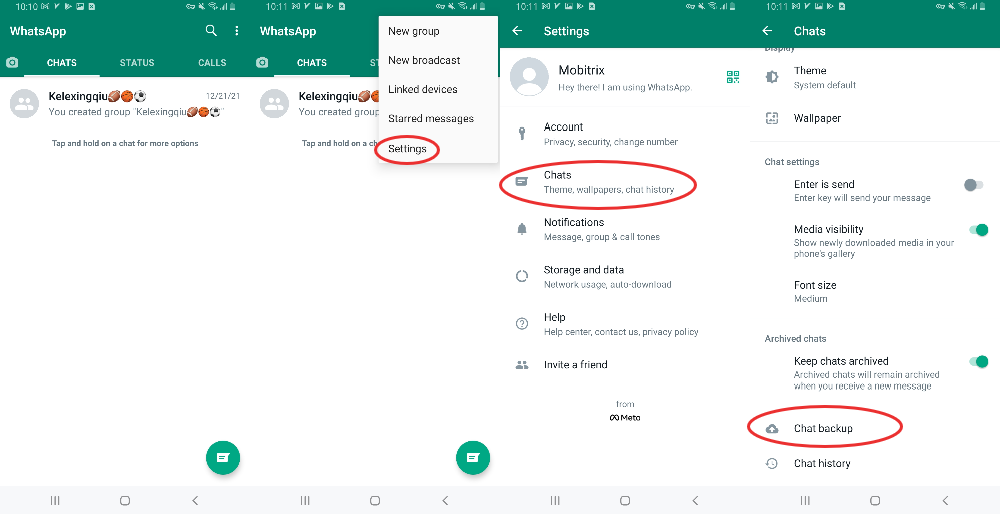
A Gmail address is also tied to Google Drive. But Gmail itself is not a backup format for WhatsApp. Backups are stored in Google Drive under WhatsApp’s backup section.
Read Also: Is it safe to install iOS 26 beta?
Why iOS 18 (or any iPhone) Cannot Directly Use Google Drive / Gmail Backups?
iOS WhatsApp app does not support restoring from Google Drive.
The backup formats and storage systems are incompatible. Backups on Google Drive are encrypted and tied to Android version of WhatsApp. iPhone expects backups from iCloud.
The WhatsApp FAQ explicitly states that you cannot restore chat history from Google Drive on iPhone.
What Does “Gmail backup” Really Mean?
Sometimes “backup to Gmail” is used by people incorrectly. Here is what it often refers to:
Export chat to email: WhatsApp has an export chat option. A chat can be exported to .txt file, optionally with media, and then sent via Gmail.
This exported chat cannot be imported back to WhatsApp to restore full history. It acts like an archive or reference, not a true backup in WhatsApp’s system.
What iOS 18 or iPhones Can Do When Moving from Android?
While direct restore from Google Drive is not supported, Windows / Mac / third-party tools + official move options exist.
Use “Move to iOS” App
WhatsApp supports transfer of chats from Android to iPhone using the Move to iOS app.
You Must Also Like: What does the iOS 17.6 update do?
Both phones must be set up: The iPhone must be new or reset to factory settings. Then during setup, Move to iOS is used. WhatsApp chats (plus media, groups, etc.) can be moved.
Third-Party Tools
Some third-party tools claim to restore WhatsApp from Google Drive to iPhone (via a PC or intermediary Android device).
Tools like MobileTrans, Wondershare, Mutsapper are often mentioned. They require connecting both devices and sometimes require downloading the Google Drive backup first to an Android device.
What iOS 18 Brings: Any New Features or Changes?
As of now, no official update in iOS 18 or WhatsApp has been announced that allows direct restore from Google Drive. (At least up to 2025-2026)
WhatsApp’s FAQ still says platform-based cloud backups: Android→Google Drive, iPhone→iCloud. No cross-platform support for backups.
So iOS 18 doesn't change that limitation.
Why This Limitation Exists?
What You Can Do Instead?
Conclusion
So, can iOS 18 pick your WhatsApp backup from Gmail (Google Drive)? No, not directly. The platforms and backup systems are different. However, moving from Android to iPhone is possible using Move to iOS or third-party tools.
Exporting via Gmail is possible for archiving but not for restoring full chat history. If you are planning the switch, back up your chats properly on Android, follow the Move to iOS method, and then begin backing up to iCloud. That way, your data stays safe.
Read Also : Back when I was how Does Dancing With The Stars Encroachment Democratic Finish important?
 Tove Svendson
Can iOS 18 pick my whatsapp backup from Gmail Many people switch phones. Some move from Android to iPhone. A big worry comes when WhatsApp backup is on Google Drive (or Gmail-connected).
Will iOS 18 let you restore it easily? The short answer is: No—not directly. But there are ways to move your chats. This post explains what is possible, what is not, and what tools or steps can help.
What WhatsApp Backup Options Exist?
A Gmail address is also tied to Google Drive. But Gmail itself is not a backup format for WhatsApp. Backups are stored in Google Drive under WhatsApp’s backup section.
Read Also: Is it safe to install iOS 26 beta?
Why iOS 18 (or any iPhone) Cannot Directly Use Google Drive / Gmail Backups?
iOS WhatsApp app does not support restoring from Google Drive.
The backup formats and storage systems are incompatible. Backups on Google Drive are encrypted and tied to Android version of WhatsApp. iPhone expects backups from iCloud.
The WhatsApp FAQ explicitly states that you cannot restore chat history from Google Drive on iPhone.
What Does “Gmail backup” Really Mean?
Sometimes “backup to Gmail” is used by people incorrectly. Here is what it often refers to:
Export chat to email: WhatsApp has an export chat option. A chat can be exported to .txt file, optionally with media, and then sent via Gmail.
This exported chat cannot be imported back to WhatsApp to restore full history. It acts like an archive or reference, not a true backup in WhatsApp’s system.
What iOS 18 or iPhones Can Do When Moving from Android?
While direct restore from Google Drive is not supported, Windows / Mac / third-party tools + official move options exist.
Use “Move to iOS” App
WhatsApp supports transfer of chats from Android to iPhone using the Move to iOS app.
You Must Also Like: What does the iOS 17.6 update do?
Both phones must be set up: The iPhone must be new or reset to factory settings. Then during setup, Move to iOS is used. WhatsApp chats (plus media, groups, etc.) can be moved.
Third-Party Tools
Some third-party tools claim to restore WhatsApp from Google Drive to iPhone (via a PC or intermediary Android device).
Tools like MobileTrans, Wondershare, Mutsapper are often mentioned. They require connecting both devices and sometimes require downloading the Google Drive backup first to an Android device.
What iOS 18 Brings: Any New Features or Changes?
As of now, no official update in iOS 18 or WhatsApp has been announced that allows direct restore from Google Drive. (At least up to 2025-2026)
WhatsApp’s FAQ still says platform-based cloud backups: Android→Google Drive, iPhone→iCloud. No cross-platform support for backups.
So iOS 18 doesn't change that limitation.
Why This Limitation Exists?
What You Can Do Instead?
Conclusion
So, can iOS 18 pick your WhatsApp backup from Gmail (Google Drive)? No, not directly. The platforms and backup systems are different. However, moving from Android to iPhone is possible using Move to iOS or third-party tools.
Exporting via Gmail is possible for archiving but not for restoring full chat history. If you are planning the switch, back up your chats properly on Android, follow the Move to iOS method, and then begin backing up to iCloud. That way, your data stays safe.
Read Also : Back when I was how Does Dancing With The Stars Encroachment Democratic Finish important?